

Add user feedback on task input(s)#
In this chapter we will:
display ewoks inputs received from a link.
The input in this tutorial is percentiles.
For this we will use two user friendly sliders using QSlider (one for each percentiles)
The behavior will be the following:
when the ‘percentiles’ inputs arrive it will update the sliders
when the data arrives it will execute the task and provide ‘data’ to the next widget
First we will create a dedicated widget to display the inputs.
 1from silx.gui import qt
 2
 3class MyWidget(qt.QWidget):
 4    def __init__(self, parent):
 5        super().__init__(parent)
 6        self.setLayout(qt.QFormLayout())
 7
 8        self._minPercentiles = qt.QSlider(qt.Qt.Orientation.Horizontal)
 9        self._minPercentiles.setTickPosition(qt.QSlider.TickPosition.TicksBelow)
10        self._minPercentiles.setEnabled(False)
11        self._minPercentiles.setRange(0, 100)
12        self._minPercentiles.setTickInterval(10)
13        self.layout().addRow(
14            "min percentiles",
15            self._minPercentiles,
16        )
17
18        # max percentiles
19        self._maxPercentiles = qt.QSlider(qt.Qt.Orientation.Horizontal)
20        self._maxPercentiles.setTickPosition(qt.QSlider.TickPosition.TicksBelow)
21        self._maxPercentiles.setEnabled(False)
22        self._maxPercentiles.setRange(0, 100)
23        self._maxPercentiles.setTickInterval(10)
24        self.layout().addRow(
25            "max percentiles",
26            self._maxPercentiles,
27        )
28
29    def setPercentiles(self, percentiles: tuple):
30        self._minPercentiles.setValue(percentiles[0])
31        self._maxPercentiles.setValue(percentiles[1])
Hint
l10: At the moment we only want to provide feedback tot the users and not let them define this value
Then we can link it to the ewoksorange widget
 1from ewokscore.missing_data import is_missing_data
 2
 3class OWClipData(
 4    OWEwoksWidgetOneThread,
 5    ewokstaskclass=ClipDataTask,
 6):
 7    # ...
 8    want_main_area = True
 9    want_control_area = False
10
11    def __init__(self, parent=None):
12        super().__init__(parent)
13
14        self._myWidget = MyWidget(self)
15        self.mainArea.layout().addWidget(self._myWidget)
16
17    def handleNewSignals(self):
18        percentiles = self.get_task_input_value("percentiles")
19        if not is_missing_data(percentiles):
20            self._myWidget.setPercentiles(percentiles)
21        return super().handleNewSignals()
Hint
l8-9: orange already defines a QDialog in each widget. Those dialog are separated in two - the control ant the main area. For this widget we only care about the main area
l14-15: append the widget to the orange widget.
l17: when ewoks receives a new signal (when we press run on the python widget for example) it will trigger this function.
l18-20: we can retrieve the task inputs from ‘get_task_input_value’. If the input is not defined then the condition l19 will be false. So we will only update the GUI when percentiles are defined.
l21: call parent ‘handleNewSignals()’ to resume casual processing. Then the task can be executed and output propagated.
Then once you will reprocess your workflow you should have:
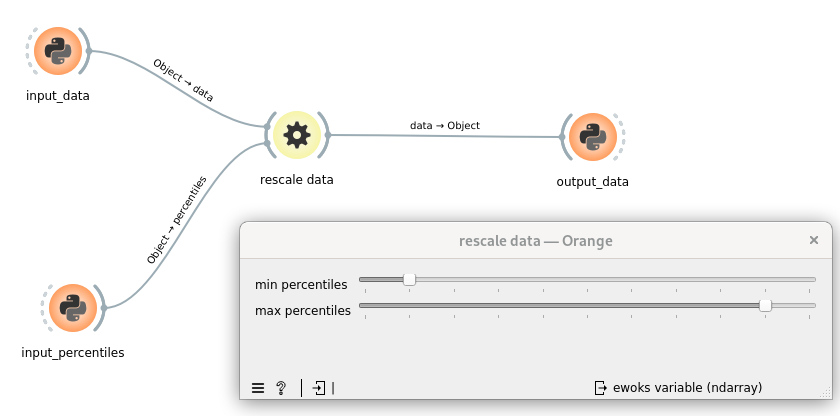
Results
"""
clipdata.py: Core code for the ClipDataTask, which is a task to rescale 'data' (numpy array) to the given percentiles.
Includes the ewoks task and the pydantic models.
"""

import numpy
from ewokscore.model import BaseInputModel
from ewokscore.model import BaseOutputModel
from ewokscore.task import Task
from pydantic import Field


class InputModel(BaseInputModel):
    data: numpy.ndarray = Field(..., description="data to rescale")
    percentiles: tuple[float, float] = Field(
        ...,
        description="""percentiles to use for rescaling, must be a tuple of two values (p_min, p_max) with p_min <= p_max""",
    )


class OutputModel(BaseOutputModel):
    data: numpy.ndarray = Field(..., description="rescaled data")


class ClipDataTask(
    Task,
    input_model=InputModel,
    output_model=OutputModel,
):
    """
    Task to rescale 'data' (numpy array) to the given percentiles.
    """

    def run(self):
        data = self.inputs.data
        # compute data min and max
        percentiles = self.inputs.percentiles

        self.outputs.data = numpy.clip(
            data,
            a_min=numpy.percentile(data, percentiles[0]),
            a_max=numpy.percentile(data, percentiles[1]),
        )
"""MyWidget.py: contains GUI specific code"""

from silx.gui import qt


class MyWidget(qt.QWidget):
    def __init__(self, parent):
        super().__init__(parent)
        self.setLayout(qt.QFormLayout())

        self._minPercentiles = qt.QSlider(qt.Qt.Orientation.Horizontal)
        self._minPercentiles.setTickPosition(qt.QSlider.TickPosition.TicksBelow)
        self._minPercentiles.setEnabled(False)
        self._minPercentiles.setRange(0, 100)
        self._minPercentiles.setTickInterval(10)
        self.layout().addRow(
            "min percentiles",
            self._minPercentiles,
        )

        # max percentiles
        self._maxPercentiles = qt.QSlider(qt.Qt.Orientation.Horizontal)
        self._maxPercentiles.setTickPosition(qt.QSlider.TickPosition.TicksBelow)
        self._maxPercentiles.setEnabled(False)
        self._maxPercentiles.setRange(0, 100)
        self._maxPercentiles.setTickInterval(10)
        self.layout().addRow(
            "max percentiles",
            self._maxPercentiles,
        )

    def setPercentiles(self, percentiles: tuple):
        self._minPercentiles.setValue(percentiles[0])
        self._maxPercentiles.setValue(percentiles[1])
"""
OWClipData.py: Code for the orange add-on binding.
"""

from ewokscore.missing_data import is_missing_data
from ewokstesttuto.gui.MyWidget import MyWidget
from ewokstesttuto.tasks.clipdata import ClipDataTask

from ewoksorange.gui.owwidgets.threaded import OWEwoksWidgetOneThread


class OWClipData(
    OWEwoksWidgetOneThread,
    ewokstaskclass=ClipDataTask,
):
    name = "rescale data"
    id = "orange.widgets.my_project.ClipDataTask"
    description = "widget to clip data (numpy array) within a percentile range."
    want_main_area = True
    want_control_area = False

    _ewoks_inputs_to_hide_from_orange = ("percentiles",)

    def __init__(self, parent=None):
        super().__init__(parent)

        self._myWidget = MyWidget(self)
        self.mainArea.layout().addWidget(self._myWidget)

    def handleNewSignals(self):
        percentiles = self.get_task_input_value("percentiles")
        if not is_missing_data(percentiles):
            self._myWidget.setPercentiles(percentiles)

        return super().handleNewSignals()