

How to get input from GUI ?#
In this chapter we will:
get an ewoks input directly from the (orange) GUI
We saw previously how to Add user feedback on task input(s).
Now we want to go further and let the user provide input directly from the GUI.
First think to do is update MyWidget widget to allow user edition of ‘percentiles’:
--- /home/docs/checkouts/readthedocs.org/user_builds/ewoksorange/checkouts/latest/doc/tutorials/my_first_widget/materials/input_gui_read_only/MyWidget.py
+++ /home/docs/checkouts/readthedocs.org/user_builds/ewoksorange/checkouts/latest/doc/tutorials/my_first_widget/materials/input_gui_user_input/MyWidget.py
@@ -10,7 +10,6 @@

         self._minPercentiles = qt.QSlider(qt.Qt.Orientation.Horizontal)
         self._minPercentiles.setTickPosition(qt.QSlider.TickPosition.TicksBelow)
-        self._minPercentiles.setEnabled(False)
         self._minPercentiles.setRange(0, 100)
         self._minPercentiles.setTickInterval(10)
         self.layout().addRow(
@@ -21,7 +20,6 @@
         # max percentiles
         self._maxPercentiles = qt.QSlider(qt.Qt.Orientation.Horizontal)
         self._maxPercentiles.setTickPosition(qt.QSlider.TickPosition.TicksBelow)
-        self._maxPercentiles.setEnabled(False)
         self._maxPercentiles.setRange(0, 100)
         self._maxPercentiles.setTickInterval(10)
         self.layout().addRow(
@@ -32,3 +30,6 @@
     def setPercentiles(self, percentiles: tuple):
         self._minPercentiles.setValue(percentiles[0])
         self._maxPercentiles.setValue(percentiles[1])
+
+    def getPercentiles(self) -> tuple:
+        return (self._minPercentiles.value(), self._maxPercentiles.value())
Then we can know when the sliders are updated from the QSlider valueChanged signal. And use it to keep the ewoks task up to date as well.
 1class OWClipData(
 2    OWEwoksWidgetOneThread,
 3    ewokstaskclass=ClipDataTask,
 4):
 5    name = "rescale data"
 6    id = "orange.widgets.my_project.ClipDataTask"
 7    description = "widget to clip data (numpy array) within a percentile range."
 8    want_main_area = True
 9    want_control_area = False
10
11    def __init__(self, parent=None):
12        super().__init__(parent)
13
14        self._myWidget = MyWidget(self)
15        self.mainArea.layout().addWidget(self._myWidget)
16        # connect signal / slot
17        self._myWidget._minPercentiles.valueChanged.connect(self._percentileChanged)
18        self._myWidget._maxPercentiles.valueChanged.connect(self._percentileChanged)
19
20    def handleNewSignals(self):
21        percentiles = self.get_task_input_value("percentiles")
22        if not is_missing_data(percentiles):
23            self._myWidget.setPercentiles(percentiles)
24        return super().handleNewSignals()
25
26    def _percentileChanged(self):
27        self.set_dynamic_input("percentiles", self._myWidget.getPercentiles())
Hint
l17-18: connect the sliders to the ‘_percentileChanged’ callback function
- l26-27: when one of the input value change we can update on the fly the input of the ewoks tasks. For this we can use two functions:
‘set_dynamic_input’: will only define the input of ewoks on the fly
‘set_default_input’: will define ewoks input on the fly and update orange settings. So this value will be saved within the .ows file. To be used carefully, especially if some input can be heavy.
Sometime it can be ‘counterintuitive’ to the user to be able to provide an input from both a link and a GUI. In this case you can hide the input from the link by using the _ewoks_inputs_to_hide_from_orange class attribute. This will hide the defined inputs from the ‘links’ interface.
class OWClipData(
    OWEwoksWidgetOneThread,
    ewokstaskclass=ClipDataTask,
):
    ...
    _ewoks_inputs_to_hide_from_orange = ("percentiles", )
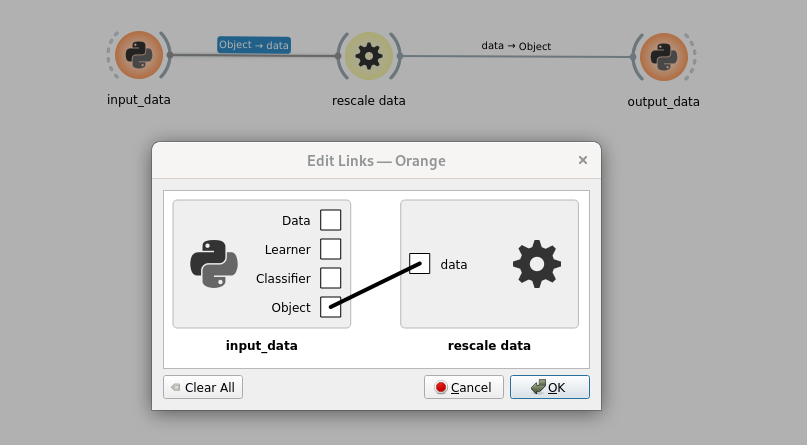
And we can also remove update of the QSlider when receiving a ‘percentiles’ inputs (as this is now fully defined by the GUI). And only initialize it in the constructor.
 1class OWClipData(
 2    OWEwoksWidgetOneThread,
 3    ewokstaskclass=ClipDataTask,
 4):
 5    name = "rescale data"
 6    id = "orange.widgets.my_project.ClipDataTask"
 7    description = "widget to clip data (numpy array) within a percentile range."
 8    want_main_area = True
 9    want_control_area = False
10
11    _ewoks_inputs_to_hide_from_orange = ("percentiles", )
12
13    def __init__(self, parent=None):
14        super().__init__(parent)
15
16        self._myWidget = MyWidget(self)
17        self.mainArea.layout().addWidget(self._myWidget)
18
19        # set up percentiles
20        self._myWidget.setPercentiles((10, 90))
21
22        # connect signal / slot
23        self._myWidget._minPercentiles.valueChanged.connect(self._percentileChanged)
24        self._myWidget._maxPercentiles.valueChanged.connect(self._percentileChanged)
25
26    def _percentileChanged(self):
27        self.set_dynamic_input("percentiles", self._myWidget.getPercentiles())
28        self.execute_ewoks_task()
Hint
l20: We define percentiles values directly from the GUI. This could be done by reading pydantic models default value. See Retrieving pydantic model fields default values for more details.
Now the python widget ‘input_percentiles’ can be removed as it has been replace by the GUI.
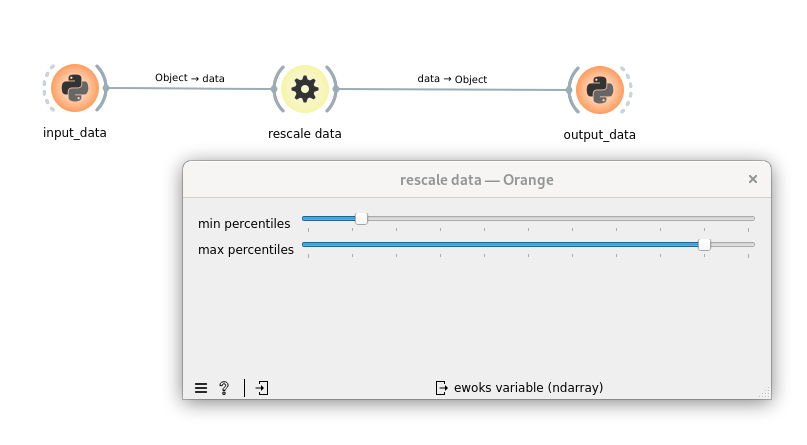
Note
setPercentiles function will not automatically call ‘valueChanged’ of the QSlider. So to have percentiles input defined automatically you can either call _percentileChanged in the constructor or update the setPercentiles function.
Hint
to make sure the inputs are propagated you can add a print of the inputs in the EwoksTask (ClipDataTask)
Warning
You have to be careful when triggering the processing. You might not want to launch the processing each time one input is updated. Especially if the processing is very time consuming. But maybe when one particular input is changed.
Results
"""
clipdata.py: Core code for the ClipDataTask, which is a task to rescale 'data' (numpy array) to the given percentiles.
Includes the ewoks task and the pydantic models.
"""

import numpy
from ewokscore.model import BaseInputModel
from ewokscore.model import BaseOutputModel
from ewokscore.task import Task
from pydantic import Field


class InputModel(BaseInputModel):
    data: numpy.ndarray = Field(..., description="data to rescale")
    percentiles: tuple[float, float] = Field(
        ...,
        description="""percentiles to use for rescaling, must be a tuple of two values (p_min, p_max) with p_min <= p_max""",
    )


class OutputModel(BaseOutputModel):
    data: numpy.ndarray = Field(..., description="rescaled data")


class ClipDataTask(
    Task,
    input_model=InputModel,
    output_model=OutputModel,
):
    """
    Task to rescale 'data' (numpy array) to the given percentiles.
    """

    def run(self):
        data = self.inputs.data
        # compute data min and max
        percentiles = self.inputs.percentiles

        self.outputs.data = numpy.clip(
            data,
            a_min=numpy.percentile(data, percentiles[0]),
            a_max=numpy.percentile(data, percentiles[1]),
        )
"""MyWidget.py: contains GUI specific code"""

from silx.gui import qt


class MyWidget(qt.QWidget):
    def __init__(self, parent):
        super().__init__(parent)
        self.setLayout(qt.QFormLayout())

        self._minPercentiles = qt.QSlider(qt.Qt.Orientation.Horizontal)
        self._minPercentiles.setTickPosition(qt.QSlider.TickPosition.TicksBelow)
        self._minPercentiles.setRange(0, 100)
        self._minPercentiles.setTickInterval(10)
        self.layout().addRow(
            "min percentiles",
            self._minPercentiles,
        )

        # max percentiles
        self._maxPercentiles = qt.QSlider(qt.Qt.Orientation.Horizontal)
        self._maxPercentiles.setTickPosition(qt.QSlider.TickPosition.TicksBelow)
        self._maxPercentiles.setRange(0, 100)
        self._maxPercentiles.setTickInterval(10)
        self.layout().addRow(
            "max percentiles",
            self._maxPercentiles,
        )

    def setPercentiles(self, percentiles: tuple):
        self._minPercentiles.setValue(percentiles[0])
        self._maxPercentiles.setValue(percentiles[1])

    def getPercentiles(self) -> tuple:
        return (self._minPercentiles.value(), self._maxPercentiles.value())
"""
OWClipData.py: Code for the orange add-on binding.
"""

from ewokstesttuto.gui.MyWidget import MyWidget
from ewokstesttuto.tasks.clipdata import ClipDataTask

from ewoksorange.gui.owwidgets.threaded import OWEwoksWidgetOneThread


class OWClipData(
    OWEwoksWidgetOneThread,
    ewokstaskclass=ClipDataTask,
):
    name = "rescale data"
    id = "orange.widgets.my_project.ClipDataTask"
    description = "widget to clip data (numpy array) within a percentile range."
    want_main_area = True
    want_control_area = False

    _ewoks_inputs_to_hide_from_orange = ("percentiles",)

    def __init__(self, parent=None):
        super().__init__(parent)

        self._myWidget = MyWidget(self)
        self.mainArea.layout().addWidget(self._myWidget)

        # set up percentiles
        self._myWidget.setPercentiles((10, 90))

        # connect signal / slot
        self._myWidget._minPercentiles.valueChanged.connect(self._percentileChanged)
        self._myWidget._maxPercentiles.valueChanged.connect(self._percentileChanged)

    def _percentileChanged(self):
        self.set_dynamic_input("percentiles", self._myWidget.getPercentiles())
        self.execute_ewoks_task()